
How to Train Your Dragon:
Riders of the Skies
Game Menu UX
I was the solo UX/UI designer on the project. I designed the main user flow in Figma along with the motion inputs for the menus. I also used Photoshop to create 2D art assets for both the UI screens and gameplay HUD elements based on the IP’s branding style guide, and implemented them into Unity along with the 3D menu scene layouts.
FarBridge
7
Jan 2025 - Mar 2025
Nex Inc.
Nex Playground
Studio:
Team Size:
Timeline:
Publisher:
Platform:
Goal:
Design an interaction system that takes advantage of the hardware and IP
Controller Input: The Playground includes a remote that is used to navigate the system level menus, and some games on the platform choose to use this input method for their own menus. While this approach offered the most straight-forward design and implementation, I felt it was also the least in line with the vision of the Playground and didn’t take advantage of the hardware’s motion tracking capability.

Hand Tracked Cursor: An option was to make use of the Playground’s motion tracking to use the players’ hands like a cursor on a computer screen. It would have used the motion controls, but ultimately, it still didn’t feel active in the way that platform looks to encourage. Furthermore, the cursor interaction created additional technical and accessibility challenges due to the precision required of the tracking and the intent for this to be a 2-player experience.

Immersive Motion Control: I and the team wanted the player to put down the controller and engage in active play as soon as possible. It was ultimately decided that designing interactions around dynamic gestures and setting the context in the arena of Berk was the best way to move forward for this game.

Proof of Concept:
Fish Toss Dragon Selection
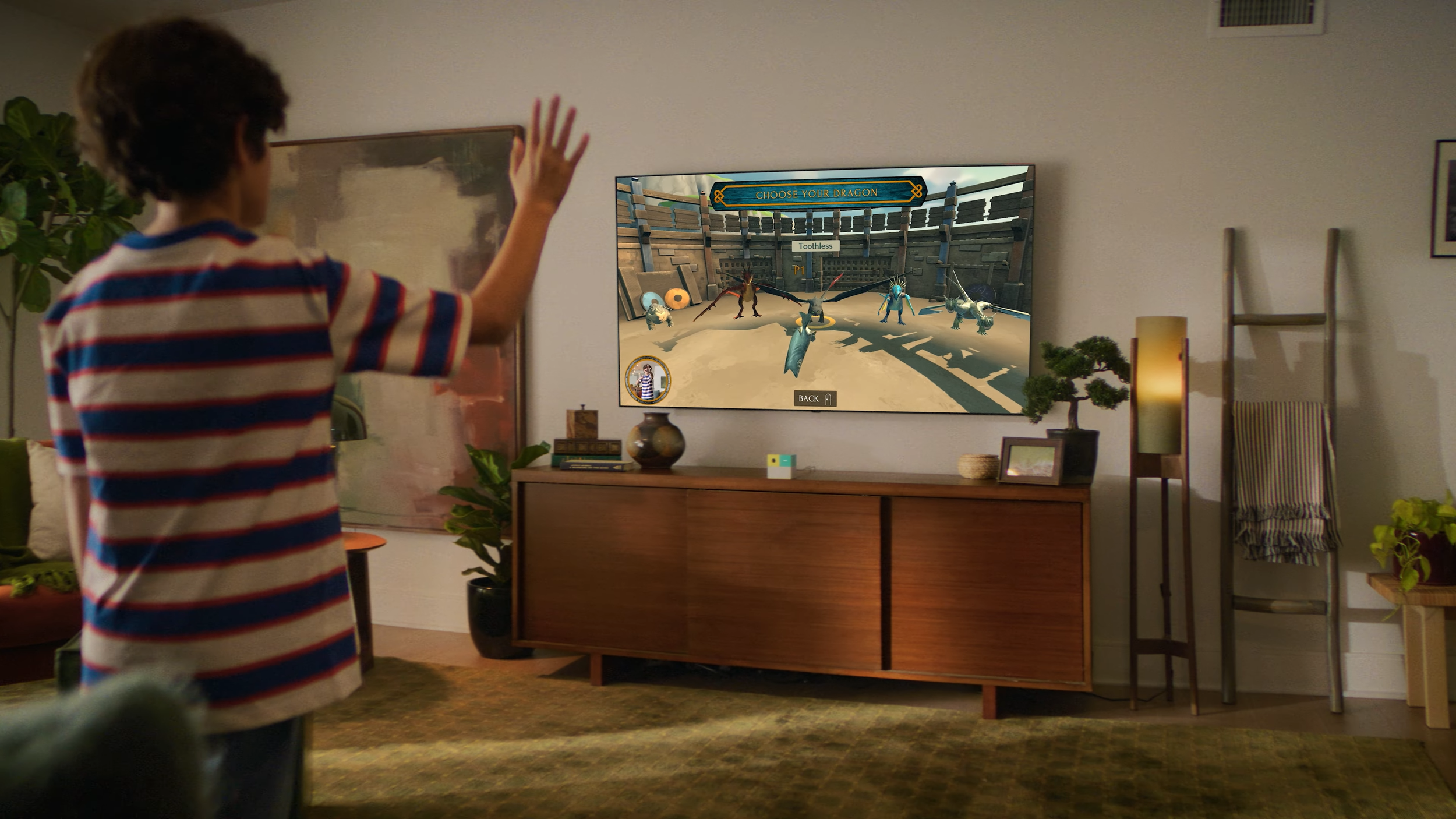
For a first attempt at implementing an immersive motion control system, I brainstormed a dragon selection menu environment. Tossing a fish to your chosen dragon checked all the boxes on what we were looking to accomplish with our interaction designs for the game menus. It directly reflected a scene in the movie while also engaging with the platform’s focus on active gameplay.
Initial Sketches
Aim - Move hand left or right to move selection between dragons
Toss - Make a quick hand motion to toss a fish to the selected dragon
Confirm - Players are prompted to continue or go back and make a different selection
Challenge:
Players were reluctant to put down the controller
The transition from using the Nex controller to navigate system menus to the motion inputs in our game proved not to be an intuitive one. We also needed to collect some information from the player like a photo for their local leaderboard scores and which hand they wanted to use to aim.
Solution: Design a calibration flow to welcome players into the experience while also serving gameplay settings choices.
After testing, the initial pass on the calibration flow (top) was determined to take too long, and the reliability of the hardware’s facial and motion tracking technology negated the need for some steps. These two factors allowed the shipping calibration flow (bottom) to be even faster and smoother experience.
Primary Player Flow
Main Menu / Player Count Selection
“Track” Selection / Leaderboard
Calibration
“Coaching” Screen
Difficulty Selection
In-Game Pause
Dragon Selection
Post-Game / Score Screen